Evaluate RapidoForm for feedback, enquiries and survey workflows. Use a real pilot to compare editing, respondent experience, connections and the plan your team will need.
Start free · Preview your flow · Choose a plan around your needs
Find your fit
Separate the form from everything it triggers.
A useful comparison starts with what your team needs to accomplish. The notes below summarize each platform's positioning; the pilot steps are RapidoForm's editorial evaluation guidance.
On your shortlist
Jotform
Jotform offers customizable forms, conditional logic, payments, reports and workflow tools. Official product overview ↗
Keep Jotform on your shortlist when a payment, document or workflow tool is central to your process. Check each dependency individually; a replacement form does not automatically replace the wider workflow.
Try the workflow here
RapidoForm
Build forms, surveys and quizzes with editable questions, themes and preview tools. Start from a template and shape the flow around the information your team needs.
Evaluate RapidoForm when you want to create a focused feedback, enquiry or intake experience. Check the current plan and setup guide for every required capability.
Published by RapidoForm. Product summaries reviewed 15 October 2026 using the linked official pages. Availability and plan terms can change.
Compare with evidence
What to test before choosing a form builder
Use the same questions, sample answers and reviewers in each candidate tool. Record what works and what needs extra configuration.
Decision area
Run this test
A useful result
Form complexity
Start with a form your team can explain in one sentence. List required fields, branches and validation rules before recreating it.
Every question serves the stated purpose and each branch has a complete ending.
Workflow dependencies
Document any payment, signature, document or approval steps. Verify supported behavior and plan availability for each one.
The new setup covers the full process you need, with no assumed feature parity.
Ongoing ownership
Ask the teammate who maintains the form to change a question, update choices and review a test response.
Routine updates can be made and checked by the people who own the process.
A starting point you can use
Try this pilot: a service enquiry
Rebuild a small, representative form before moving a live workflow. Adapt this question sequence to your audience.
01Which service interests you?
02What are you trying to achieve?
03When would you like to begin?
04How can the team reply?
Inside RapidoForm
Take a look inside your next form.
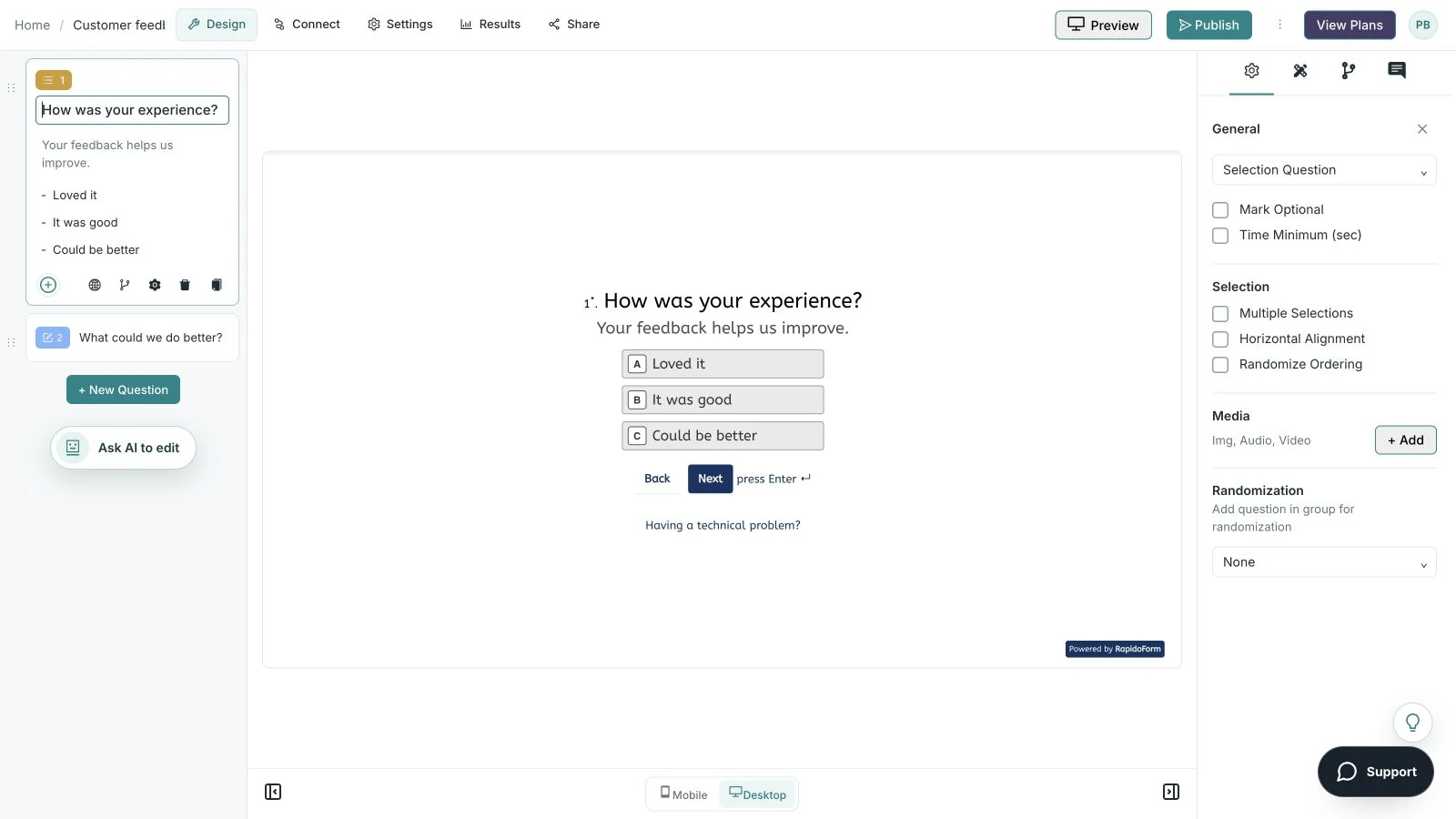
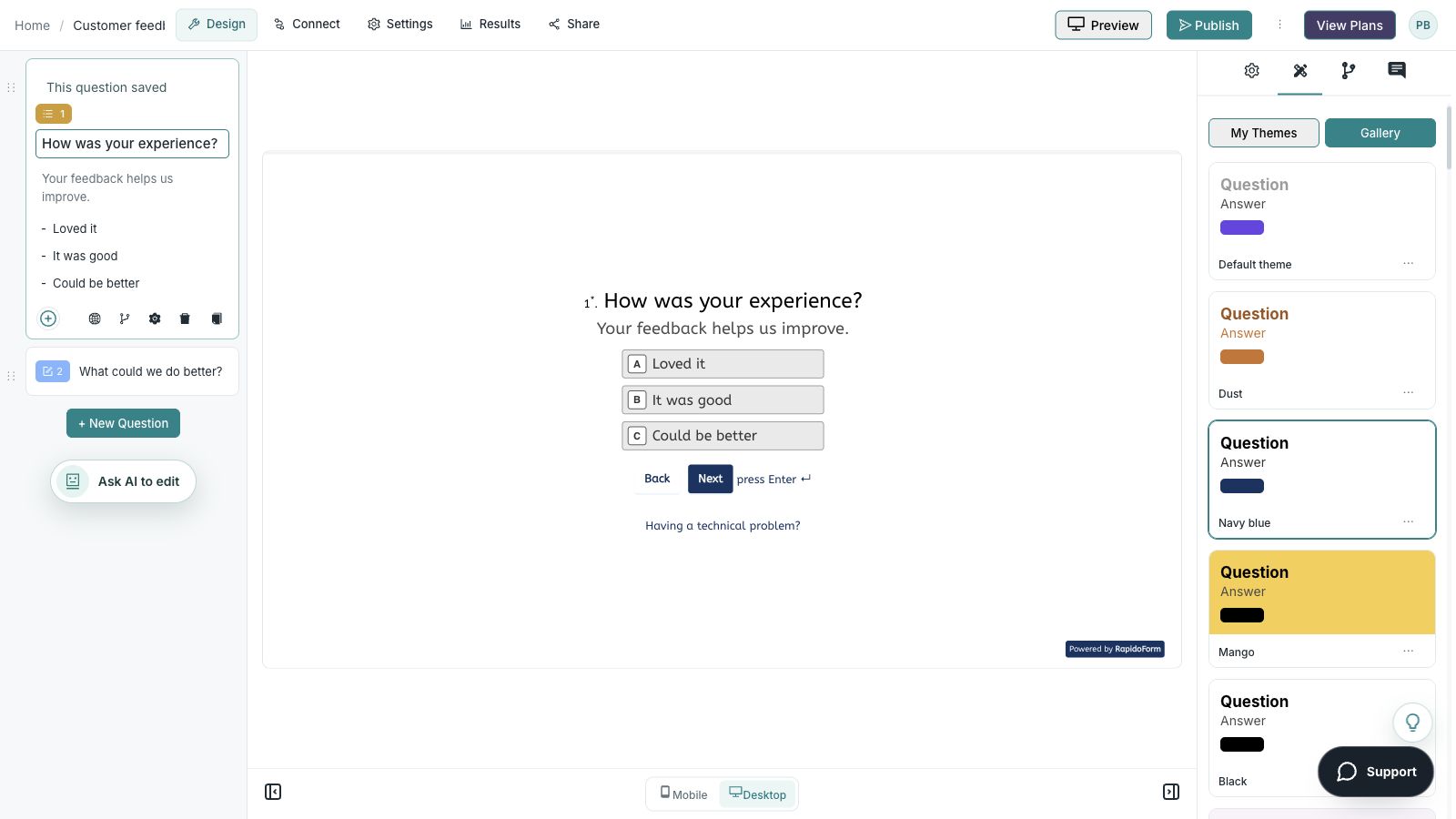
See where you choose questions, edit the wording, and preview the experience. These real builder screens show a sample feedback form you can use as a starting point.
Real product · sample feedback form
Make the wording yoursEdit your question and answer choices alongside the respondent preview.
Showing: Make the wording yours. Screens use sample content. Feature availability varies by plan.
A quick look around
The whole flow in 25 seconds.
Choose a question, edit the answers, explore themes, and switch to the mobile preview.
A silent guided sequence of real builder screens, using a sample feedback form.
Edit the question, description, and answer choices.
Choose a theme from the gallery and inspect the desktop preview.
Switch to mobile preview to check the respondent experience.
Switch with a clear plan
Move the workflow in stages.
Separate submitted answers, uploaded files, payment records and generated documents in your migration inventory. Verify retention and access for each; one response export may not include all connected records.
01
Inventory
Save the questions, choices, branches, theme, notification rules and destinations. Identify the owner of each downstream step.
02
Preserve
Export the records you need to keep and verify that files remain accessible. Document retention and access requirements before closing an account.
03
Rebuild and test
Create a pilot with synthetic data. Test the common path, optional fields, a changed answer, validation and the final message on desktop and mobile.
04
Switch and review
Update embeds and invitation links after the pilot passes. Check the first real responses with the workflow owner and keep a fallback plan.
This is a manual evaluation and migration checklist. It does not promise automatic import of another platform's forms, logic or historical responses.
A useful buying checklist
Choose the plan for the whole workflow.
The headline price is only one part of the decision. Write down what your team needs now, then compare the plan that actually supports it.
Usage and storage
Estimate the number of forms, responses and files you expect. Include seasonal campaigns, file sizes and the time you need to retain records.
People and capabilities
Check collaborators, branding, question logic, AI allowances and required connections. Confirm which features are included in the plan you select.
Billing and switching
Compare the same currency and billing period. Review renewal and cancellation terms, then include the effort needed to rebuild, test and maintain your workflow.
Answers to common switching and evaluation questions.
Can RapidoForm replace every Jotform workflow?
Evaluate the workflow you actually use. Payments, signatures, generated documents, approvals and integrations need their own checks. Start with a form pilot and confirm requirements against current documentation and plans.
Can I try RapidoForm before switching?
Start with a free account and a representative pilot. Check current plan allowances for the features you need, and test the complete respondent and review experience before changing a live workflow.
Will my existing responses move with the new form?
Keep an export of historical responses and associated files before making changes. A new form and its future responses are separate from historical records; confirm any supported import process instead of assuming one.
How should I compare the total cost?
Compare the plan that supports your actual workflow, including response volume, storage, collaborators, required features and billing period. Include time to rebuild, test and maintain the form. Review current terms before purchasing.