Hear the why.
Collect spoken feedback, or pair a rating or choice with an audio explanation.
Explore audio questionsGuide · Getting started
A useful survey begins before the first question. Learn how to define an objective, reach the right people, write clearly, and plan what happens after the responses arrive.
Start free Audio & video questions Customize without code
Go deeper than a text box. Add audio and video questions to your forms and surveys, so people can explain an experience in their own words.
Collect spoken feedback, or pair a rating or choice with an audio explanation.
Explore audio questionsCollect video answers for customer stories, introductions, and qualitative research.
Explore video questionsRecording and storage allowances vary by plan. Compare plans →
Start with the outcome
Write one sentence describing the decision the survey will support. This keeps the questionnaire focused and helps you remove questions that are merely interesting.
An objective such as “find the hardest onboarding step” is easier to investigate than “learn everything about our customers.” Name the action the findings could change.
Define who should answer and how you will reach them. Explain the purpose in the invitation and respect the difference between invited people and actual respondents.
Decide how you will review choices, ratings, and comments. Plan the response handling, owner, and next step while you can still edit the questions.
Inside RapidoForm
See where you choose question types, edit answer options, and check the respondent experience. This short tour makes the first building steps easier to picture.
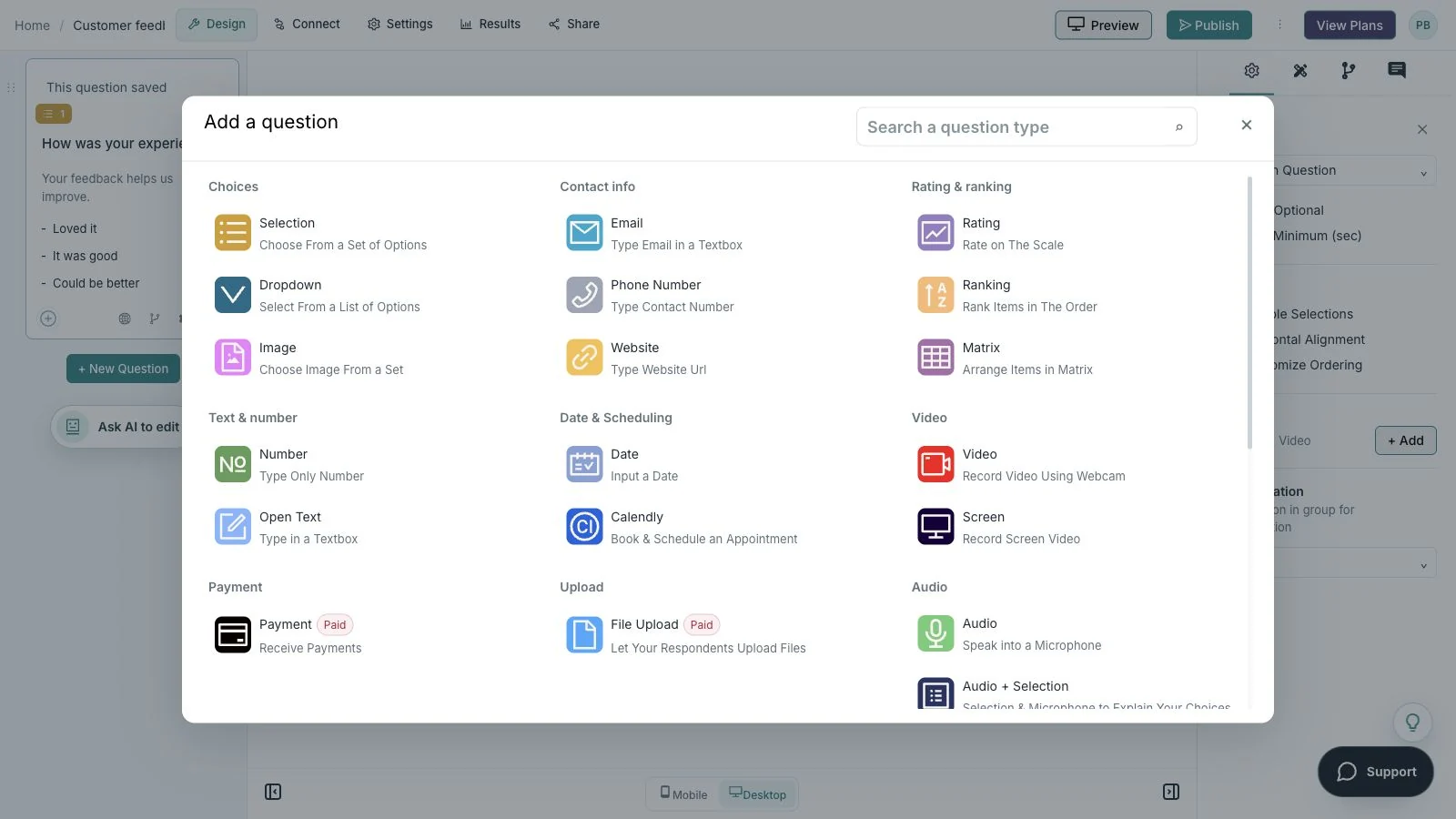
Showing: Choose a question. Screens use sample content. Feature availability varies by plan.
A quick look around
Choose a question, edit the answers, explore themes, and switch to the mobile preview.
A silent guided sequence of real builder screens, using a sample feedback form.
Try the builder for free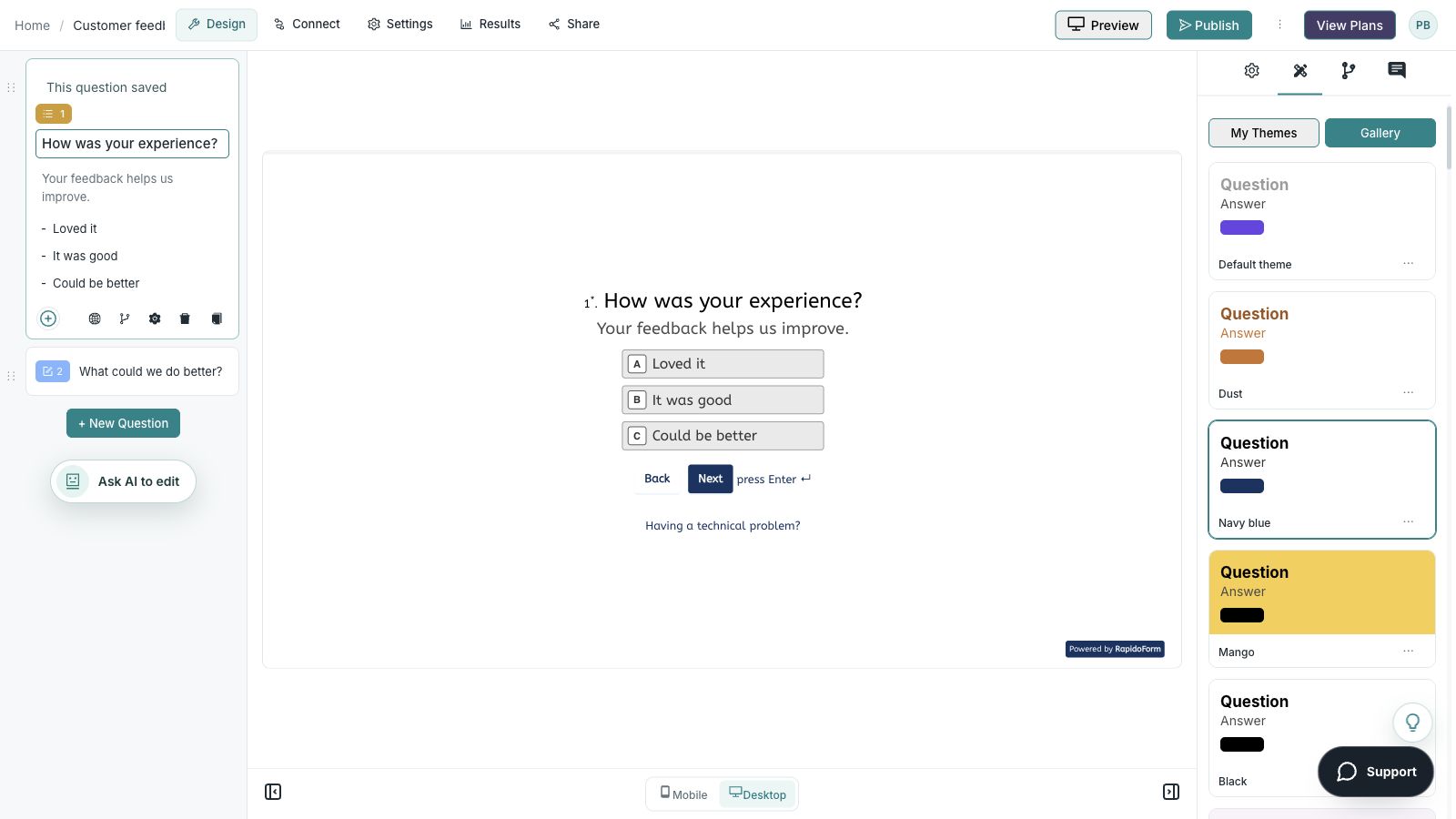
Picture the possibility
A small team wants to improve an event. It chooses one question to investigate, invites people who attended, and asks about specific parts of the experience before planning the next session.
Why RapidoForm
RapidoForm gives you a way to draft, preview, and share a survey without starting from a coded page. Bring a clear objective and use the builder to keep the respondent journey focused.
Explore current plans and usageChoose a structure close to the purpose, then remove unrelated questions and adapt the wording. You can refine the form as you learn what information is actually useful.
See the first-form workflowReview the questions as a respondent would see them. Check required answers, long choices, mobile readability, and any conditional path together.
Read about question routingPublish the finished survey and use the available sharing controls. Open the respondent link separately before inviting the full audience.
See the publishing checklistFrom principle to practice
Keep the first version manageable. A small pilot is a chance to discover misunderstandings before they affect the full study.
Define the objective, relevant audience, distribution channel, and response review process. Decide what personal information is actually necessary.
Use plain, neutral wording and one idea per question. Test with someone similar to the audience and ask them to explain what each question means.
Publish the checked version, invite the audience, and review the responses in context. Document the findings and assign a practical next action.
Start with an easy, relevant question. Group related topics and put sensitive or optional detail later, after explaining its purpose. Do not require an answer that a respondent cannot reasonably provide.
Tell people what the survey is about and give a realistic time estimate from a trial run. A confirmation message should explain what happens to the answers and whether a follow-up is expected.
Choose question formatsThe people who respond may differ from those who do not. A public link or a large response count does not by itself establish that the results represent a wider population.
Keep an account of recruitment, timing, wording, and response count. Look for patterns, read exceptions, and distinguish an observation from a causal explanation.
Find your starting point
Start with a situation your audience recognizes, then shape the questions around the next step.
Choose one interaction and a small set of relevant questions.
Ask about clarity, usefulness, and a specific improvement.
Explain the purpose and how responses will be reviewed.
Make it useful
Use this planning worksheet before opening the builder.
| Planning question | Example answer | Why it matters |
|---|---|---|
| What decision are we supporting? | Which onboarding step should we improve first? | Keeps unrelated topics out of the survey. |
| Who can answer from experience? | People who completed setup in the past two weeks. | Connects the audience to the objective. |
| What do we need to ask? | Task, difficult step, effort rating, and explanation. | Creates a focused question sequence. |
| How will we invite them? | A clear invitation after the setup experience. | Makes recruitment and timing explicit. |
| What happens after collection? | Review weekly, group issues, and assign one investigation. | Turns answers into an owned next step. |
Use these as starting points. Adapt the wording, choices, and required fields to your audience before publishing.
A small change with a purpose
Clear wording helps someone give you the information you actually need. Here are two improvements to try.
“We want to know everything about our audience.”
“We want to understand which onboarding step needs clearer guidance.”
A specific objective helps you decide which questions belong.
“Everyone should answer this survey.”
“Invite people who completed the relevant setup during the chosen period.”
A defined audience connects the findings to a real experience.
Put the idea into practice
Choose one improvement for the next session.
Example introduction
Help us make the next session more useful. Please think about the event you attended and share one thing we should keep or improve.
Presentation / Discussion / Practical exercise / Another part
Identify a strength without requiring a long response.
Very unclear through very clear
Measure one aspect of the event.
A specific change or topic.
Gather an actionable suggestion.
Who this is for
People who attended the event.
How the path works
Keep the first survey linear unless a clear audience difference needs a follow-up. Use a small pilot to check that attendees interpret each question as intended.
Example ending
“Thank you for helping shape the next session. We will review the feedback when planning the next event.”
Illustrative setup. Adapt the wording and behavior to your audience.
After the first response
You do not need a complicated analysis system to make the first survey useful. Start with a clear way to read and discuss what people tell you.
Look at the choices and the comments together before selecting a conclusion. Notice missing context or a confusing question.
Assign an owner for an improvement the evidence supports. Keep other ideas available for a later study or review.
Use the pilot and early responses to refine the wording. Keep a record of changes when you plan to compare repeated surveys.
The details matter
Give the form a complete trial run, including the routes you do not expect most people to take. Check your workspace plan before relying on a feature or response limit.
Compare plan featuresMake the idea yours
You have the idea. Give it a clear structure, make it feel like your brand, and preview the experience before inviting your audience.
Start free. Explore paid features and limits when your workflow needs them.
A short introduction, relevant questions, a realistic completion estimate, and a clear confirmation.
Good questions
More detail before you get started.
Visit the help centerA template is a useful first draft. Review its questions, scales, required fields, and confirmation message against your objective rather than publishing it unchanged.
A pilot is a small trial with people similar to your intended respondents. It helps reveal unclear wording, missing choices, unnecessary questions, and technical problems before a wider launch.
Review whether you reached the relevant audience and obtained answers that support the decision. Completion and response count help describe collection, but usefulness also depends on clarity and interpretation.
RapidoForm offers a free plan alongside paid plans. Check the pricing page for current response limits, AI allowances, integrations, and other feature availability before choosing your setup.
Keep building
Turn an idea into something useful
Start with a template or a blank form, adapt it to your audience, and preview the complete experience before sharing it.
Create your surveyFree and paid plans available. Features and usage limits vary by plan.