Start with the right questions
Combine answer formats around the information you need. A choice question can establish context; an optional comment lets someone explain an exception.
RapidoForm features
Build the form, shape the experience and plan what happens next. Explore the features by the job they help you do, then try a small version in the builder.
Start free · Preview your flow · Choose a plan around your needs

From idea to published form
A good form combines useful questions, clear choices and a predictable next step. These tools help you work through each part.
Combine answer formats around the information you need. A choice question can establish context; an optional comment lets someone explain an exception.
Plan branches around meaningful answers. Test every route, including changing an earlier choice, so each respondent reaches an appropriate ending.
Use themes and color choices to connect the form with your brand. Check text contrast and selected states as well as the opening screen.
Review the respondent experience at desktop and phone widths. Try long answers, optional fields and validation so you can catch awkward moments early.
Explore the integration catalogue and follow the setup guide for your destination. Verify one synthetic response before relying on a connection.
Start with a relevant template, then review its questions and required fields. Adapt the wording to your audience instead of publishing an unchanged example.
Inside RapidoForm
See where you choose questions, edit the wording, and preview the experience. These real builder screens show a sample feedback form you can use as a starting point.
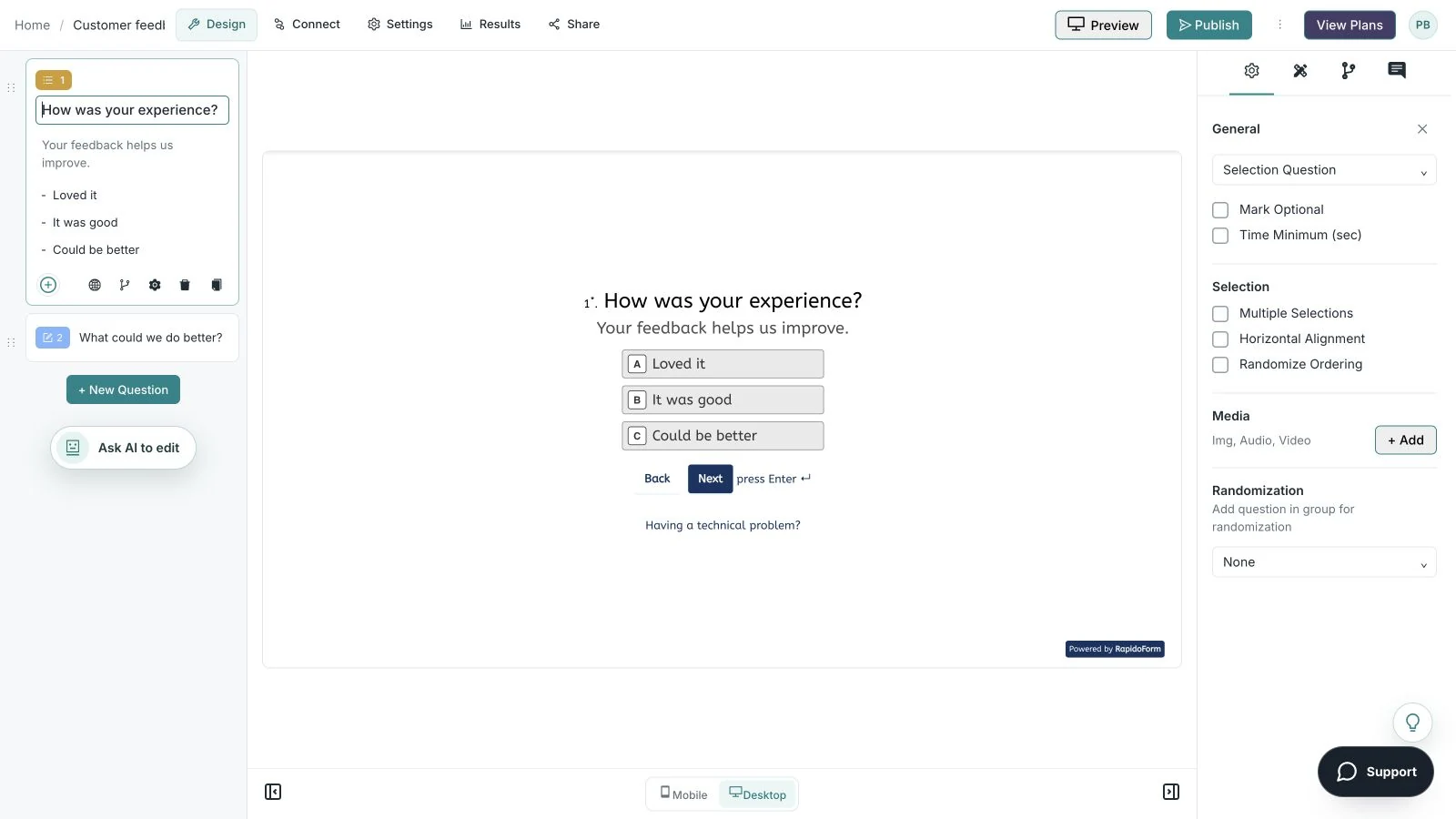
Showing: Make the wording yours. Screens use sample content. Feature availability varies by plan.
A quick look around
Choose a question, edit the answers, explore themes, and switch to the mobile preview.
A silent guided sequence of real builder screens, using a sample feedback form.
Try the builder for free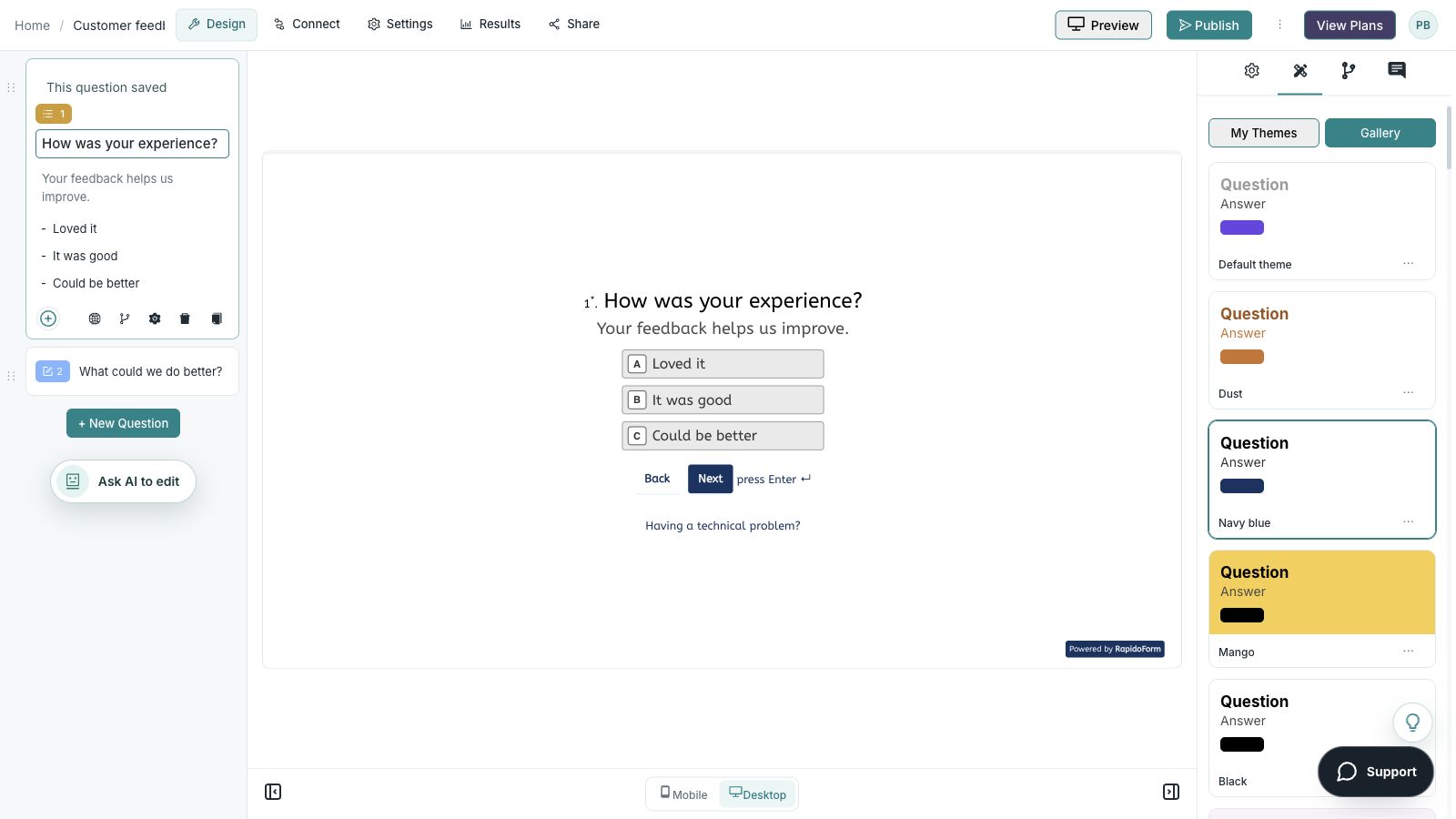
Put the tools together
Try a customer-feedback pilot before expanding to a larger survey or intake process.
Choose a specific touchpoint and the decision the feedback should inform. A form about everything makes the answers harder to interpret.
Add a balanced choice question and an optional comment. Apply your theme, test the branches and read the form on a phone.
Agree who reads the responses, how urgent issues are handled and how recurring themes become a next step. Test any connected destination.
Read the individual feature guides for more detail, or check the product updates for recent changes.
Protect your survey from malicious bots or automated activities with the bot prevention tool.
This blog explains the accessibility feature in forms and surveys. The survey accessibility feature helps visually challenged people to access the survey easily. Unlocking Insights from the Disabled Population for Better Decision-Making
Discover how RapidoForm revolutionizes team collaboration in survey creation. Learn tips for assembling a dynamic, effective survey team with RapidoForm's advanced tools.
Discover expert techniques to safeguard your online forms and surveys from malicious bots. Learn how to implement effective anti-bot measures, ensuring the integrity and accuracy of your data collection.
Unlock the secrets of conducting confidential surveys with our expert guide. Learn how to ensure respondent privacy and data security in your surveys, maintaining the highest standards of confidentiality in data collection.
Explore the intricacies of data ownership in our comprehensive guide. Discover how the equitable management of data empowers both collectors and providers, fostering a balanced and responsible approach to data handling in today's tech-driven world.
Unlock the potential of display logic in your surveys and forms. Learn how to create responsive and dynamic digital forms that adapt to user responses, ensuring a streamlined and engaging experience for your respondents.
Explore the dynamic world of smart survey design with our comprehensive guide on Skip Logic, Branch Logic, and Conditional Logic. Learn how these advanced techniques can transform your surveys into highly responsive and engaging tools for data collection.
Discover the art of organizing forms and surveys with question groups. Learn how to structure your surveys for better respondent understanding and more effective data analysis, enhancing overall efficiency and clarity.
Embrace global diversity with multilingual surveys. Discover how breaking language barriers in surveys can significantly enhance global participation, inclusivity, and the accuracy of your data collection.
Unlock the full potential of your surveys by incorporating question and answer piping. Learn how to personalize and streamline your surveys for maximum respondent engagement and accurate data collection.
Discover how randomized question sets are transforming data collection. Dive into the new era of dynamic, accurate, and efficient data gathering methods that adapt to your unique research needs.
Unlock the full potential of your surveys with RapidoForm Builder. Learn how to effectively use ranking questions to gain deeper insights and make your data collection more interactive and insightful.
Elevate your brand's professionalism and recognition with our white label survey solutions. Customize your surveys by integrating your own company URL and logo, ensuring a seamless brand experience for your respondents.
Unlock the potential of URL variables in your surveys for more efficient and personalized data collection. Learn how to seamlessly integrate URL variables to improve respondent experience and data accuracy.
Explore the vital role of secure survey software in protecting respondent data. Learn why choosing the right survey tool is essential for maintaining privacy and trust in your data collection process.
Discover how DropDown questions can transform your surveys and forms. Learn the art of creating effective, user-friendly digital surveys with our guide to utilizing DropDown menus for improved data collection and analysis.
Unlock the potential of audio feedback in your surveys. Discover how RapidoForm Builder's innovative audio question feature can transform your data collection process, making it more interactive and engaging.
Discover how to elevate your surveys with RapidoForm's form builder. This guide provides essential tips for integrating video and screen recording questions, enhancing user interaction and obtaining richer feedback. Perfect for market researchers and educators seeking innovative survey techniques.
Explore how anonymous surveys revolutionize feedback collection. Learn why anonymity in surveys is crucial for gaining honest, unfiltered insights from respondents, and how it can significantly improve the quality of data gathered.
Discover how RapidoForm is revolutionizing coding interviews with its versatile form builder. Conduct coding assessments seamlessly in multiple programming languages, ensuring a comprehensive evaluation of coding skills.
Explore the cutting-edge advancements in AI technology and discover how the latest workflow improvements can elevate your efficiency. Dive into our comprehensive guide on the newest AI features transforming the digital landscape.
Discover the exciting new features in RapidoForm! Stay ahead with our latest updates designed to enhance your form-building experience. Dive into the future of efficient, AI-powered forms today!
Unveil the 16 dynamic updates that have transformed the RapidoForm, each designed to boost efficiency and streamline your workflow. From advanced automation to enhanced user interfaces, these key upgrades are reshaping how professionals approach form management.
Discover the ease of creating online forms by uploading XLSX files directly into RapidoForm. This guide provides step-by-step instructions to transform your Excel data into fully functional web forms effortlessly.
Turn an idea into a form, then refine it with AI.
Make your questions clearer and adapt them to your audience.
Create and organize forms with a visual editor and reusable starting points.
Bring existing form content into RapidoForm.
Ask focused questions with a range of structured answer formats.
Capture written answers and practical contact details.
Hear and see the context behind an answer.
Combine a structured answer with a spoken explanation.
Collect supporting documents, consent, and signatures in your form.
Guide respondents from the first screen to the next step.
Adapt each form journey and collect more useful answers.
Match your forms to your brand and presentation needs.
Choose how respondents move through your form.
Reach your audience wherever they already are.
Turn submissions into insights you can review and share.
Keep the people behind your submissions organized.
Follow up on contacts and form submissions with reusable workflows.
Connect form responses with the tools your team uses.
Build connected workflows around your forms and responses.
Collect payments as part of a form journey.
Organize your work and collaborate with the right access.
Understand your plan, usage, and payment history.
Find guidance while you build and manage your forms.
A useful buying checklist
The headline price is only one part of the decision. Write down what your team needs now, then compare the plan that actually supports it.
Estimate the number of forms, responses and files you expect. Include seasonal campaigns, file sizes and the time you need to retain records.
Check collaborators, branding, question logic, AI allowances and required connections. Confirm which features are included in the plan you select.
Compare the same currency and billing period. Review renewal and cancellation terms, then include the effort needed to rebuild, test and maintain your workflow.
Make the next step practical
Build a small form, make it yours and preview it as a respondent. A working example gives your team something concrete to evaluate.
Try RapidoForm for freeFeatures and allowances vary by plan. View current plans