Evaluate RapidoForm for your next enquiry, registration or feedback flow. Compare the editing experience, mobile layout and the connections behind your existing forms.
Start free · Preview your flow · Choose a plan around your needs
Find your fit
Refresh the experience without losing the working process.
A useful comparison starts with what your team needs to accomplish. The notes below summarize each platform's positioning; the pilot steps are RapidoForm's editorial evaluation guidance.
On your shortlist
Wufoo
Wufoo offers customizable online forms, file collection, reporting and payment integrations. Official product overview ↗
Keep Wufoo on your shortlist when existing embedded forms and payment connections already serve your team well. Include those connections and historical records in any migration decision.
Try the workflow here
RapidoForm
Build forms, surveys and quizzes with editable questions, themes and preview tools. Start from a template and shape the flow around the information your team needs.
Evaluate RapidoForm when you want to create a focused feedback, enquiry or intake experience. Check the current plan and setup guide for every required capability.
Published by RapidoForm. Product summaries reviewed 15 October 2026 using the linked official pages. Availability and plan terms can change.
Compare with evidence
What to test before choosing a form builder
Use the same questions, sample answers and reviewers in each candidate tool. Record what works and what needs extra configuration.
Decision area
Run this test
A useful result
Embedded experience
Test a candidate form in the actual page where visitors will use it. Check narrow screens, keyboard movement and the final message.
The form fits its container and the page gives visitors a clear reason to respond.
Field behavior
Recreate choices, required fields and validation. Use realistic sample answers and intentionally leave an optional question blank.
The new form captures information with the same meaning and useful context.
Existing connections
List payment providers, file destinations and notifications separately. Confirm each required connection and test it.
The team can rely on the full process, including what happens after submission.
A starting point you can use
Try this pilot: a workshop registration
Rebuild a small, representative form before moving a live workflow. Adapt this question sequence to your audience.
01Which workshop would you like to attend?
02What is your experience with the topic?
03Is there anything the organizer should know?
04Where should we send the details?
Inside RapidoForm
Take a look inside your next form.
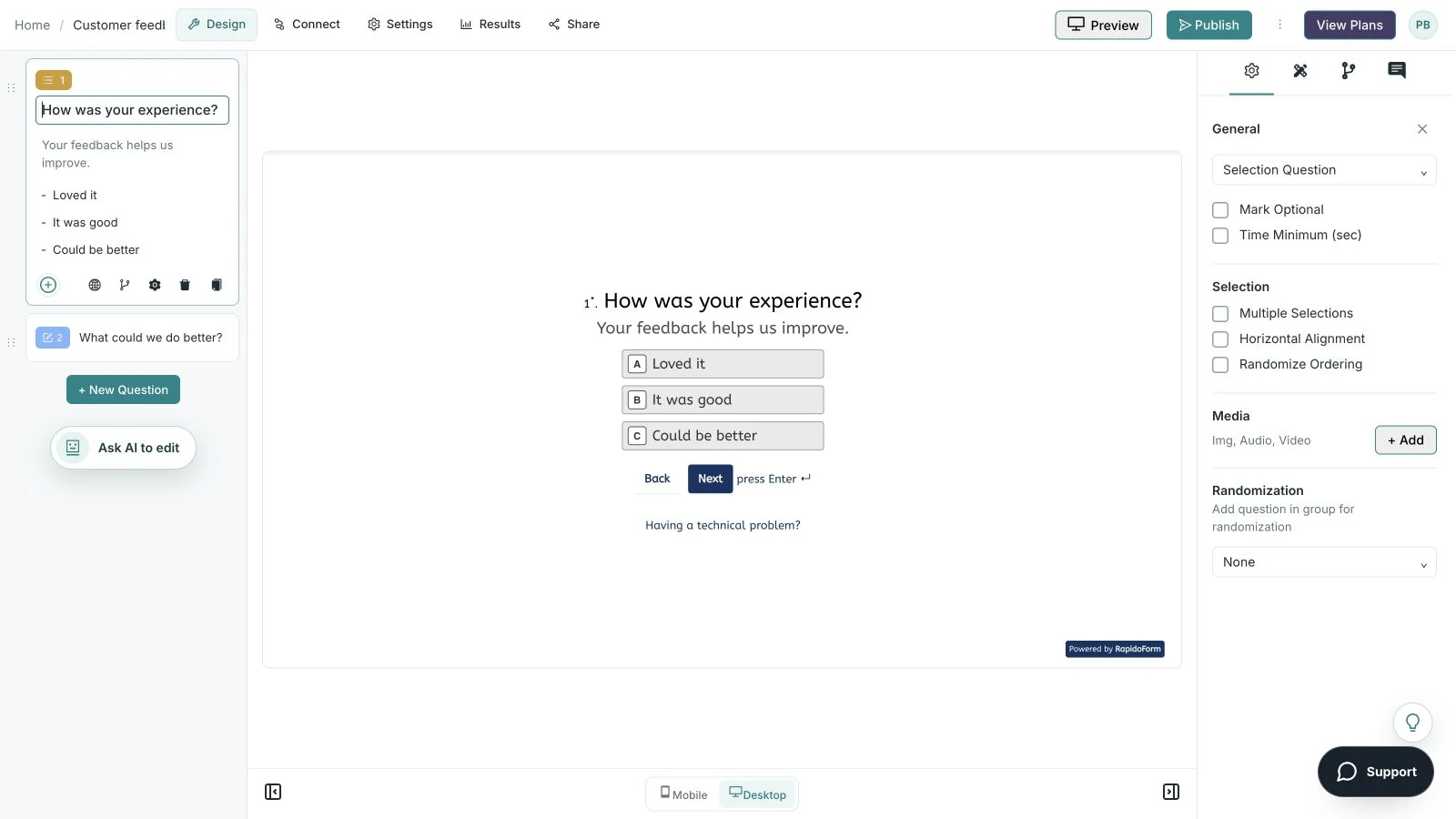
See where you choose questions, edit the wording, and preview the experience. These real builder screens show a sample feedback form you can use as a starting point.
Real product · sample feedback form
Make the wording yoursEdit your question and answer choices alongside the respondent preview.
Showing: Make the wording yours. Screens use sample content. Feature availability varies by plan.
A quick look around
The whole flow in 25 seconds.
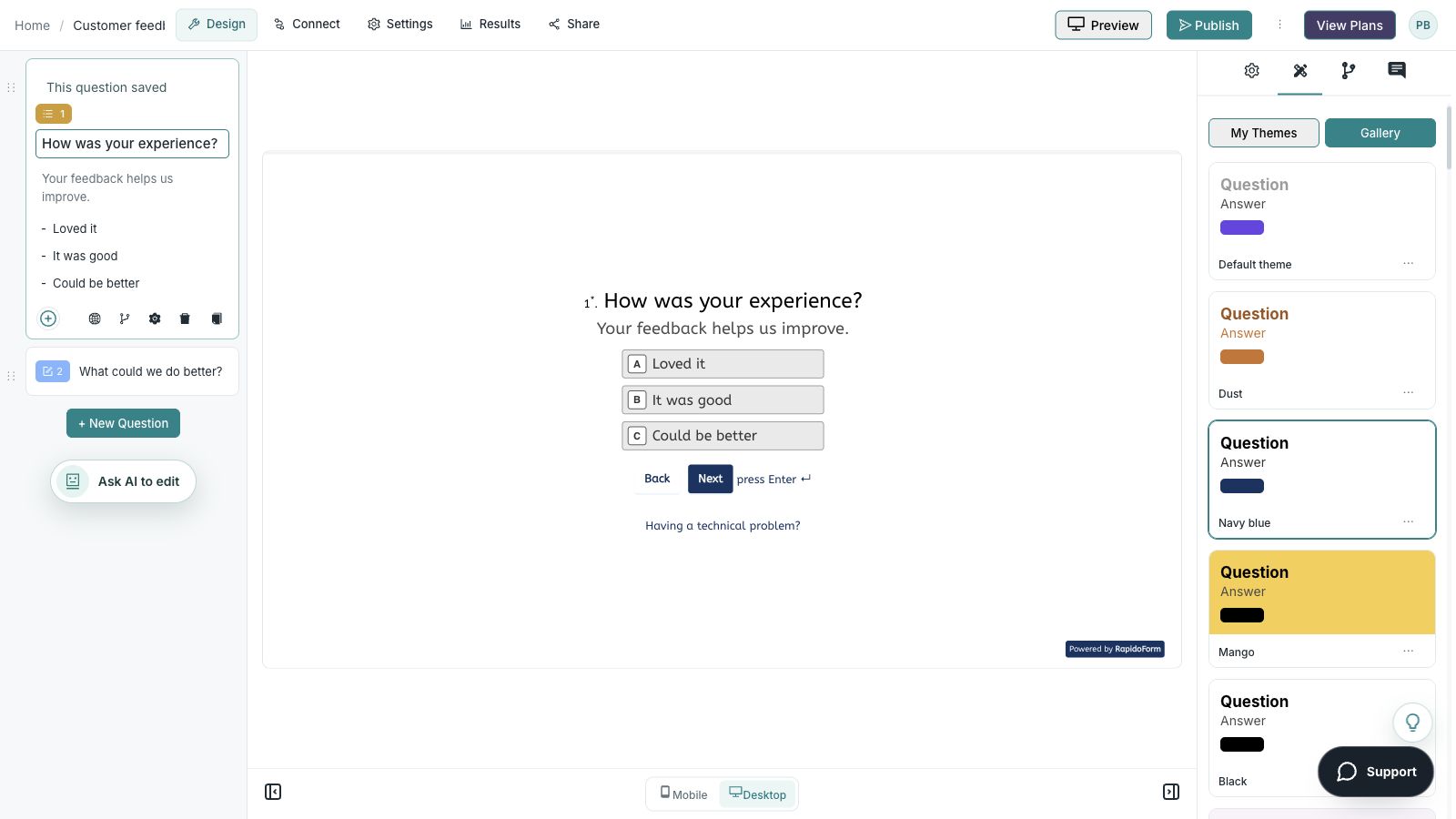
Choose a question, edit the answers, explore themes, and switch to the mobile preview.
A silent guided sequence of real builder screens, using a sample feedback form.
Edit the question, description, and answer choices.
Choose a theme from the gallery and inspect the desktop preview.
Switch to mobile preview to check the respondent experience.
Switch with a clear plan
Move the workflow in stages.
Find every embedded form and old shared link. Keep exports and attachments accessible, rebuild essential notifications and replace links only after the new form has been tested in context.
01
Inventory
Save the questions, choices, branches, theme, notification rules and destinations. Identify the owner of each downstream step.
02
Preserve
Export the records you need to keep and verify that files remain accessible. Document retention and access requirements before closing an account.
03
Rebuild and test
Create a pilot with synthetic data. Test the common path, optional fields, a changed answer, validation and the final message on desktop and mobile.
04
Switch and review
Update embeds and invitation links after the pilot passes. Check the first real responses with the workflow owner and keep a fallback plan.
This is a manual evaluation and migration checklist. It does not promise automatic import of another platform's forms, logic or historical responses.
A useful buying checklist
Choose the plan for the whole workflow.
The headline price is only one part of the decision. Write down what your team needs now, then compare the plan that actually supports it.
Usage and storage
Estimate the number of forms, responses and files you expect. Include seasonal campaigns, file sizes and the time you need to retain records.
People and capabilities
Check collaborators, branding, question logic, AI allowances and required connections. Confirm which features are included in the plan you select.
Billing and switching
Compare the same currency and billing period. Review renewal and cancellation terms, then include the effort needed to rebuild, test and maintain your workflow.
Answers to common switching and evaluation questions.
What should I check before replacing an embedded Wufoo form?
Test the new embed at desktop and phone widths, including validation and completion. Verify notifications and connected records separately, then update each page and shared link that points to the old form.
Can I try RapidoForm before switching?
Start with a free account and a representative pilot. Check current plan allowances for the features you need, and test the complete respondent and review experience before changing a live workflow.
Will my existing responses move with the new form?
Keep an export of historical responses and associated files before making changes. A new form and its future responses are separate from historical records; confirm any supported import process instead of assuming one.
How should I compare the total cost?
Compare the plan that supports your actual workflow, including response volume, storage, collaborators, required features and billing period. Include time to rebuild, test and maintain the form. Review current terms before purchasing.