Hear the why.
Collect spoken feedback, or pair a rating or choice with an audio explanation.
Explore audio questionsCustomer feedback forms
Find out what is working, where people get stuck, and what deserves attention next. Build feedback forms that make it easy to share the details behind an experience.
Start free Audio & video questions Customize without code

Go deeper than a text box. Add audio and video questions to your forms and surveys, so people can explain an experience in their own words.
Collect spoken feedback, or pair a rating or choice with an audio explanation.
Explore audio questionsCollect video answers for customer stories, introductions, and qualitative research.
Explore video questionsRecording and storage allowances vary by plan. Compare plans →
Start with the outcome
Feedback becomes valuable when a team can understand the context, identify an owner, and make a change. Connect a simple rating with the explanation that helps you decide what to do next.
Invite feedback after a real interaction, while the experience is still clear. Say which delivery, support conversation, or product task you want the person to think about.
Offer balanced choices and an optional comment field. Avoid wording that assumes the experience was positive or that a particular feature was the problem.
Explain how feedback is reviewed. Ask permission before collecting contact details, and give urgent support requests a clear route to immediate help.
Inside RapidoForm
A rating alone rarely tells the whole story. Look inside a sample feedback form with a selection question and an open-text follow-up, then see how it appears on mobile.
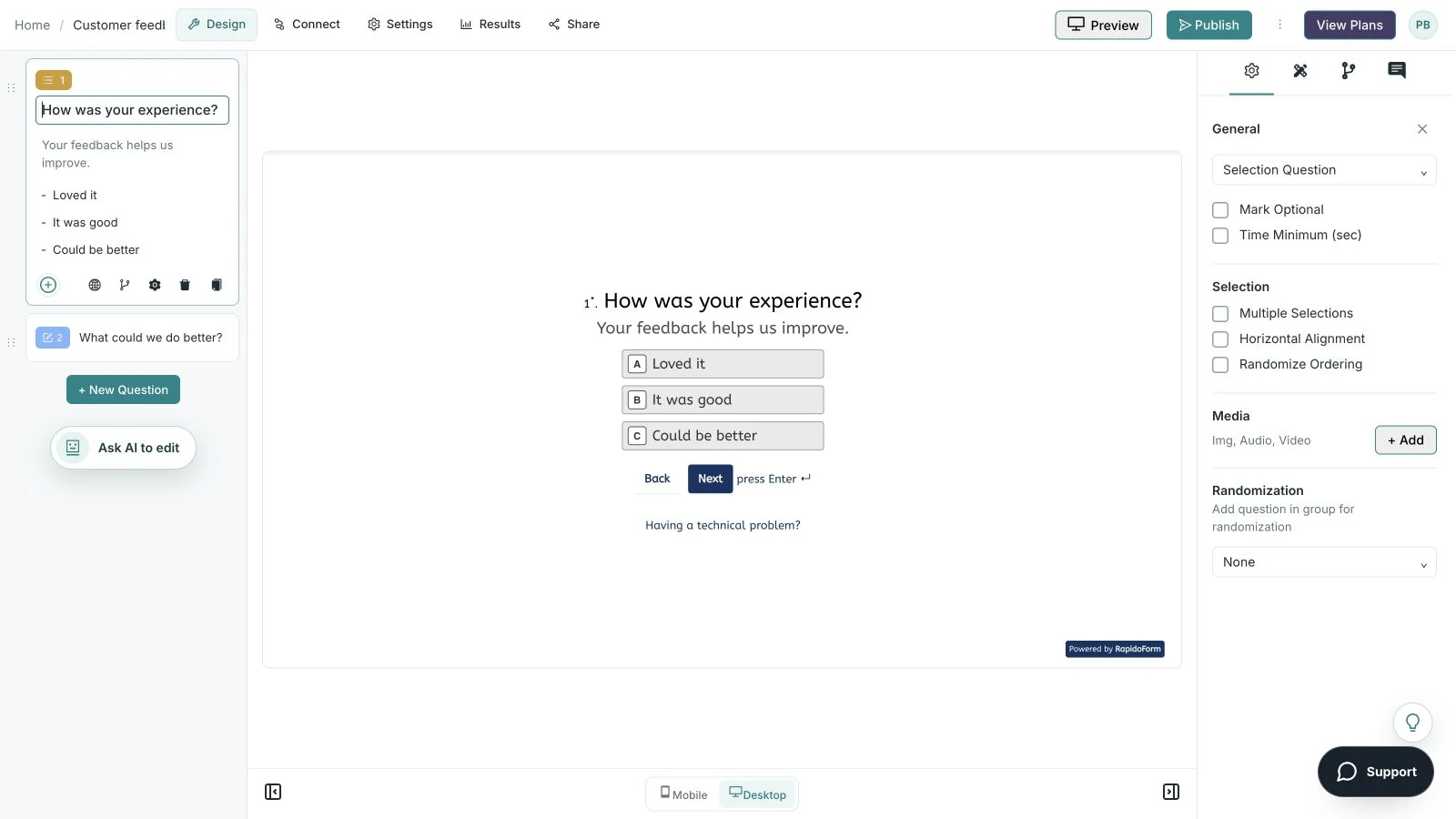
Showing: Make the wording yours. Screens use sample content. Feature availability varies by plan.
A quick look around
Choose a question, edit the answers, explore themes, and switch to the mobile preview.
A silent guided sequence of real builder screens, using a sample feedback form.
Try the builder for free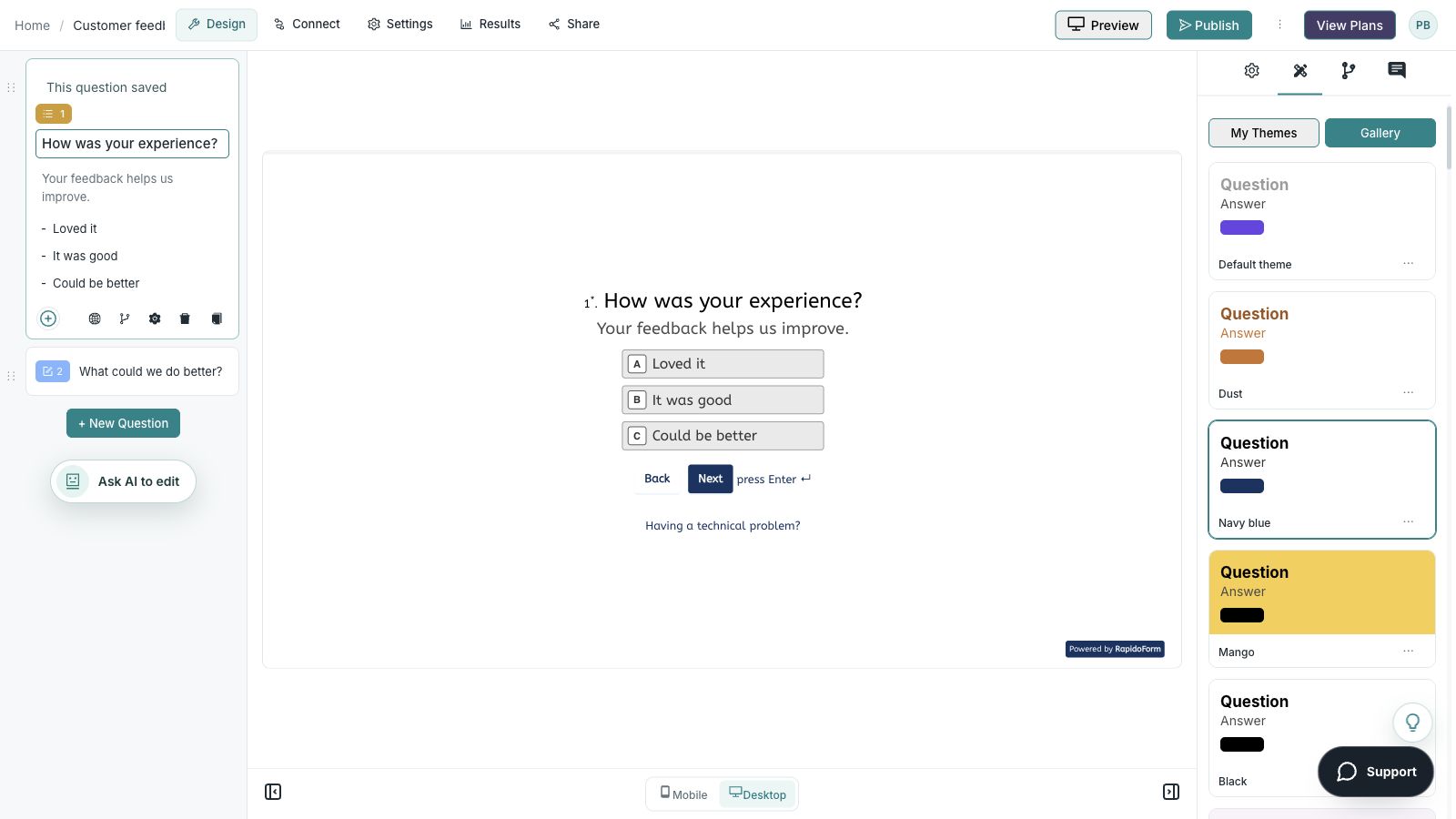
Picture the possibility
A support conversation has ended, but the learning does not have to stop there. Give customers a simple way to describe what helped, what was difficult, and whether they would welcome a follow-up.
Illustrative example. Answers stay on this page and are not submitted.
Why RapidoForm
A useful customer feedback flow respects the person’s time and gives your team enough detail to respond. RapidoForm lets you shape both the short question sequence and the experience around it.
Explore current plans and usageBuild around the interaction you want to improve. Combine a labeled measure with an optional comment so customers can answer quickly or explain an exception in their own words.
See how to structure a formUse the answer to a contact-preference question to decide whether a contact field is needed. A person who only wants to leave feedback should have a complete path too.
Explore conditional questionsCustomize the visual theme and the introduction so the feedback request feels connected to your service. Preview the question, selected answer, and validation states together.
See theme customizationYour workflow, simplified
A feedback process needs a clear review routine as well as a good form. Agree on ownership before you ask people to spend time responding.
Choose one experience to review and decide when an invitation makes sense. Keep product feedback, support requests, and general enquiries distinct.
Ask one measure and one open follow-up. Add context such as the product area only when it is needed to understand or route the answer.
Group recurring themes, assign urgent issues, and track decisions. When you promised a follow-up, tell the customer what happens next.
A satisfaction rating asks how someone felt about a defined experience. An effort question asks how easy a task was. A recommendation question asks about willingness to recommend; these measures answer different questions.
Keep the scale and wording consistent when reviewing change over time. Do not swap measures halfway through a comparison or treat a score as a complete explanation.
Choose an answer formatStart with a small set of themes such as usability, reliability, communication, and unmet needs. Record enough context to separate a one-off issue from a pattern.
Agree who handles an urgent complaint and who reviews broader suggestions. If you connect a form to another tool, test that the right fields reach the right team before sharing the form.
Explore integrationsFind your starting point
Start with a situation your audience recognizes, then shape the questions around the next step.
Ask about clarity and resolution, then offer an optional explanation.
Ask where the customer felt confident and where they needed extra help.
Focus on the specific experience while it is still easy to recall.
Make it useful
Adapt this question bank to a single touchpoint. You do not need to include every question in each survey.
| What to ask | Suggested format | How to use the answer |
|---|---|---|
| How easy was it to complete your task today? | Labeled effort scale | Identify friction in a specific journey. |
| What were you trying to do? | Short text or single choice | Understand the goal behind the experience. |
| Where did you get stuck? | Optional long text | Find the step that needs investigation. |
| What should we keep doing? | Optional long text | Preserve the parts people value. |
| Would you like someone to follow up? | Yes/no with conditional contact field | Separate actionable follow-up from anonymous commentary. |
Use these as starting points. Adapt the wording, choices, and required fields to your audience before publishing.
A small change with a purpose
Clear wording helps someone give you the information you actually need. Here are two improvements to try.
“Why were you unhappy?”
“What could we have done better during this interaction?”
The wording invites useful detail without assuming how the customer felt.
“Rate us.”
“How clear was the explanation you received?”
Naming the experience makes the rating easier to interpret.
Put the idea into practice
Find out whether the explanation helped and what remains unclear.
Example introduction
How did the conversation go? Your feedback helps us make our explanations and support process clearer.
Very unclear through very clear
Focus the measure on a specific part of the interaction.
Tell us what would have helped you understand the next step.
Capture the detail that a rating cannot provide.
Ask for a contact address only on the yes path.
Let the customer choose whether to continue the conversation.
Who this is for
Customers who have recently finished a support interaction.
How the path works
When a follow-up is requested, show the contact field and explain its purpose. Otherwise, finish the feedback flow without asking for contact details.
Example ending
“Thanks for sharing your experience. If you requested a follow-up, our team will review the contact details you provided.”
Illustrative setup. Adapt the wording and behavior to your audience.
After the first response
You do not need to act on every suggestion in the same way. You do need a consistent way to identify urgent issues, recurring themes, and useful improvements.
Route a request for help to the team that can respond. Keep broader product and service suggestions available for a different review.
Read several comments before naming a pattern. Keep the original touchpoint and the customer’s wording with the theme.
When you make an improvement based on feedback, tell the relevant audience what changed. A short, specific update makes the review process more visible.
The details matter
Give the form a complete trial run, including the routes you do not expect most people to take. Check your workspace plan before relying on a feature or response limit.
Compare plan featuresMake the idea yours
You have the idea. Give it a clear structure, make it feel like your brand, and preview the experience before inviting your audience.
Start free. Explore paid features and limits when your workflow needs them.
A touchpoint question, a balanced rating, an optional comment, and a clear follow-up preference.
Good questions
More detail before you get started.
Visit the help centerAsk when the customer has enough experience to answer the question. A short post-interaction form works for a specific service event; a broader product survey needs time for actual use.
Choose a setup that fits the purpose and explain it accurately. Do not promise anonymity if answers, hidden fields, or other collected information can identify a respondent.
Review urgent issues promptly, group recurring themes, and decide who can act on them. If a respondent requested contact, follow the process described in the form.
RapidoForm offers a free plan alongside paid plans. Check the pricing page for current response limits, AI allowances, integrations, and other feature availability before choosing your setup.
Keep building
Turn an idea into something useful
Start with a template or a blank form, adapt it to your audience, and preview the complete experience before sharing it.
Build a feedback formFree and paid plans available. Features and usage limits vary by plan.