Hear the why.
Collect spoken feedback, or pair a rating or choice with an audio explanation.
Explore audio questionsLead generation forms
Give interested visitors an easy way to tell you what they need. Build lead forms that capture useful context and set a clear expectation for the next step.
Start free Audio & video questions Customize without code

Go deeper than a text box. Add audio and video questions to your forms and surveys, so people can explain an experience in their own words.
Collect spoken feedback, or pair a rating or choice with an audio explanation.
Explore audio questionsCollect video answers for customer stories, introductions, and qualitative research.
Explore video questionsRecording and storage allowances vary by plan. Compare plans →
Start with the outcome
A lead form should help a visitor get something relevant and help your team prepare a meaningful response. Ask for enough context to act without turning a first conversation into an application process.
Make the form’s headline and confirmation match the campaign that brought someone there. Say whether they are requesting a demo, downloading a resource, or asking a question.
Ask about goals, timing, and the kind of help needed. Use branching for optional context so smaller or earlier-stage enquiries still have a sensible path.
Agree who reviews submissions and what information they need. Test the destination before the campaign launches and keep a route for failed deliveries.
Inside RapidoForm
See how the question editor, theme gallery, and mobile preview work together. This sample feedback form demonstrates the core tools for designing your own enquiry form.
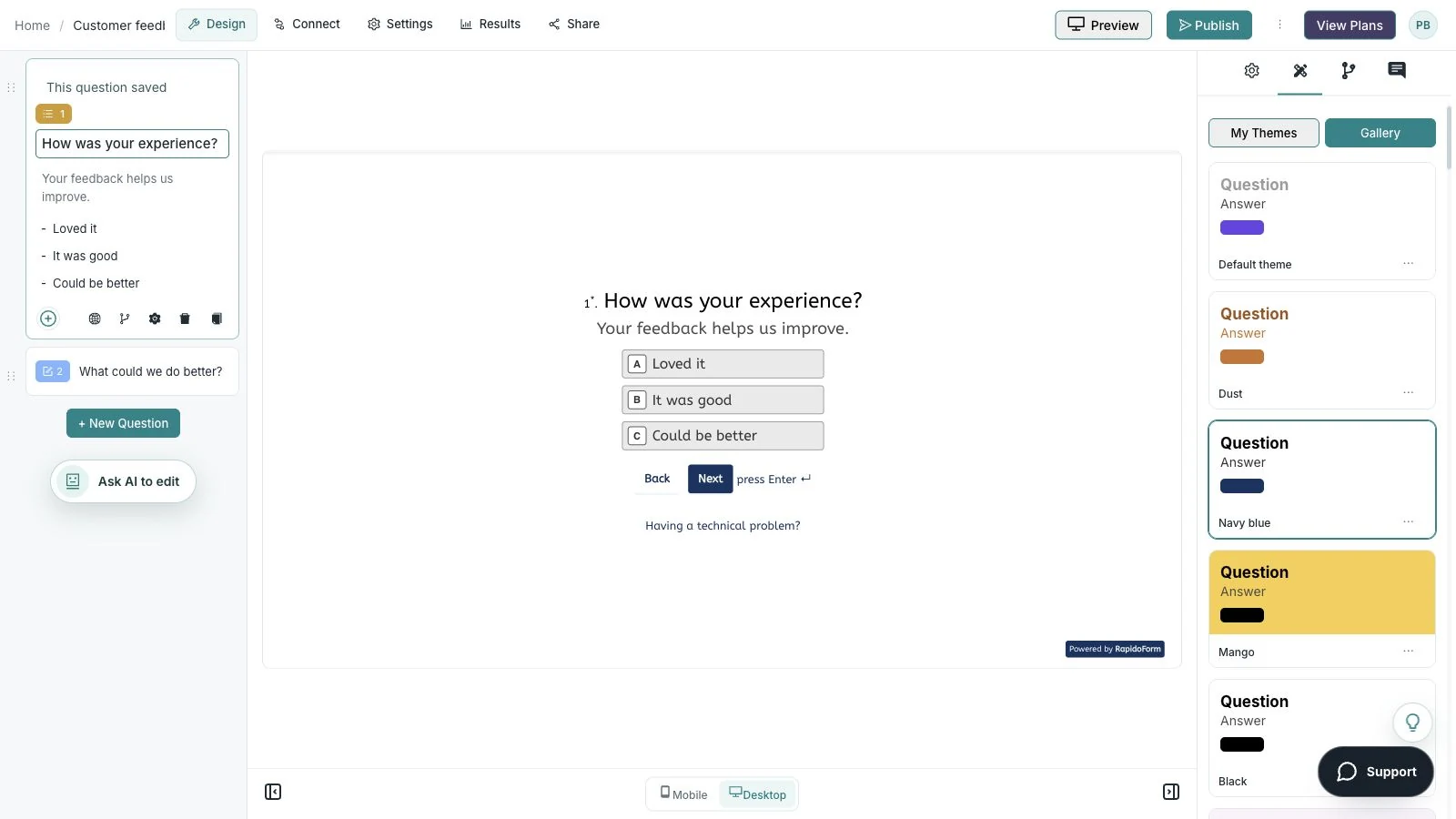
Showing: Choose your look. Screens use sample content. Feature availability varies by plan.
A quick look around
Choose a question, edit the answers, explore themes, and switch to the mobile preview.
A silent guided sequence of real builder screens, using a sample feedback form.
Try the builder for free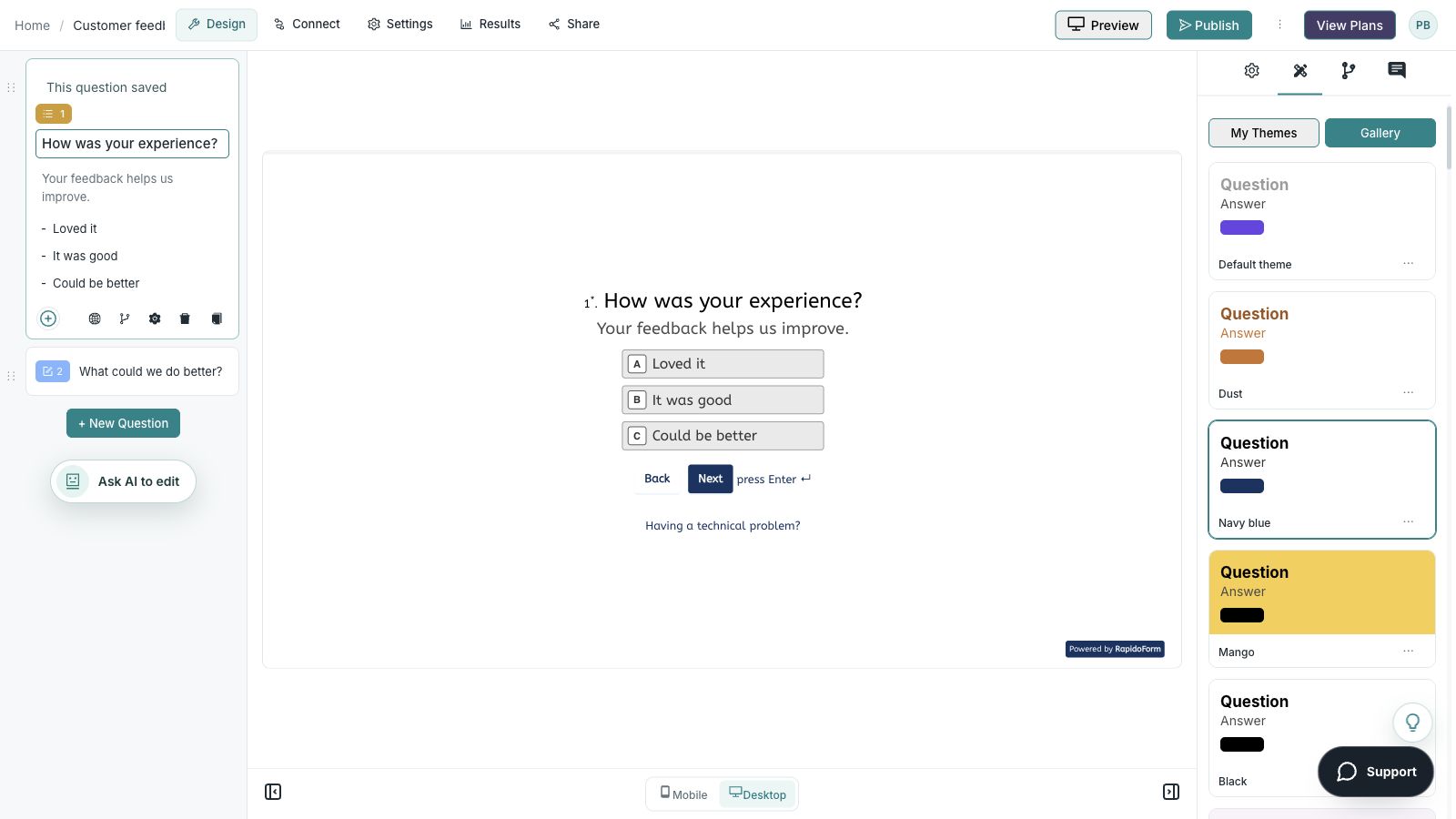
Picture the possibility
A visitor arrives from a campaign with a particular goal. A focused form keeps that promise, asks enough context for a thoughtful reply, and tells the visitor what to expect after sending the request.
Illustrative example. Answers stay on this page and are not submitted.
Why RapidoForm
RapidoForm gives you space to explain the offer, ask for relevant context, and match the response journey to the request. The value comes from a useful handoff, not simply a larger submission count.
Explore current plans and usageCustomize the introduction, questions, and visual theme around the specific offer. Someone requesting a consultation should see a journey that continues that promise.
See brand customizationUse the request type to ask a relevant follow-up. Keep an early-stage enquiry simple and collect more detail only when your team will use it.
Explore branching for enquiriesPublish the form, open its respondent link, and check the confirmation. Then review an appropriate integration route if your follow-up requires another tool.
Review publishing and sharingYour workflow, simplified
Build the whole journey: invitation, form, confirmation, and follow-up. Each step should honor the expectation created by the one before it.
Define the value: a demo, consultation, quote, or useful resource. Explain what the visitor will receive and what contact will follow.
Begin with the person’s goal, then collect the contact details needed to reply. Separate optional marketing permission from the immediate request.
Submit a test enquiry, confirm where the response arrives, and check the acknowledgement. Assign ownership so interested visitors do not wait without an update.
A short recommendation quiz can help visitors identify the option that fits their needs. Give each question a clear purpose and explain how the recommendation is reached.
Avoid putting a long questionnaire in front of a simple request. If contact details are needed for a follow-up, make that purpose clear before asking for them.
Explore quiz use casesLook beyond the submission count. Review whether enquiries contain enough context, reach the appropriate owner, and receive a useful reply.
When comparing campaigns, keep the offer and form changes in view. If you track a source with hidden fields, avoid including personal information in URLs and test how the values reach your results.
Explore the available connectionsFind your starting point
Start with a situation your audience recognizes, then shape the questions around the next step.
Ask about the visitor’s goal and the area they want to explore.
Collect a short brief and the information needed to reply.
Explain what the visitor will receive and any separate follow-up choice.
Make it useful
Choose the few questions your team actually uses to prepare a response.
| What to ask | Suggested format | How to use the answer |
|---|---|---|
| What are you trying to achieve? | Short or long text | Prepare advice around the visitor’s goal. |
| Which option are you interested in? | Single choice | Route the enquiry appropriately. |
| When are you hoping to get started? | Clear time ranges | Plan a relevant follow-up. |
| What is the best email for a reply? | Respond to the request. | |
| Would you like to receive further product updates? | Separate optional consent choice | Record a preference distinct from the enquiry. |
Use these as starting points. Adapt the wording, choices, and required fields to your audience before publishing.
A small change with a purpose
Clear wording helps someone give you the information you actually need. Here are two improvements to try.
“Tell us about your business.”
“What would you like help achieving?”
Starting with the goal makes the enquiry useful to both sides.
“Submit to learn more.”
“Request a product conversation.”
A specific call to action makes the expected next step easier to understand.
Put the idea into practice
Give the team enough context to prepare a relevant reply.
Example introduction
Tell us what you want to achieve. We will use these details to prepare a product conversation that fits your request.
Choosing an option / Planning a new workflow / Improving an existing setup
Route the enquiry around the visitor’s goal.
A short description of the result you need.
Prepare the conversation around an outcome.
Contact details for responding to this request.
Make the purpose of the contact field clear.
Who this is for
Visitors who want help choosing or using an option.
How the path works
For an existing setup, ask one focused context question. Keep optional product-update permission separate from the consultation request.
Example ending
“Your request has been received. Our team will review your goal and contact you using the reply address you provided.”
Illustrative setup. Adapt the wording and behavior to your audience.
After the first response
An enquiry is useful when the visitor gets an expected next step and your team can respond with relevant help.
Confirm the enquiry reaches the person or destination responsible for it. Review the goal, category, and contact preference together.
If people repeatedly leave an important detail unclear, improve the prompt before adding more required fields.
Look at whether enquiries lead to useful conversations, not just how many forms were submitted. Consider changes in the campaign offer when interpreting results.
The details matter
Give the form a complete trial run, including the routes you do not expect most people to take. Check your workspace plan before relying on a feature or response limit.
Compare plan featuresMake the idea yours
You have the idea. Give it a clear structure, make it feel like your brand, and preview the experience before inviting your audience.
Start free. Explore paid features and limits when your workflow needs them.
A clear offer, a goal question, an area of interest, and the contact details needed for a reply.
Good questions
More detail before you get started.
Visit the help centerUse the minimum needed to fulfill the promise and prepare a useful reply. Add qualification questions only when your team has a defined use for the answer.
Explore the integrations available for your workspace and plan. Follow the relevant setup instructions and verify a test enquiry, including consent and source fields, before launch.
Not necessarily. Use conditional questions when a detail applies only to a specific request. Keep each path complete and avoid blocking visitors who are still exploring their options.
RapidoForm offers a free plan alongside paid plans. Check the pricing page for current response limits, AI allowances, integrations, and other feature availability before choosing your setup.
Keep building
Turn an idea into something useful
Start with a template or a blank form, adapt it to your audience, and preview the complete experience before sharing it.
Create a lead formFree and paid plans available. Features and usage limits vary by plan.